
Rhyno Hu
March 6, 2026
5 min
Rhyno Hu
March 6, 2026
5 min
What if you could turn a single sentence into a full cinematic storyboard — complete with consistent characters, styled frames, and a timeline — in under 30 minutes, without hiring a single artist?
That's exactly what VeeSpark's AI storyboard generator makes possible. Creating a professional animation storyboard used to take days of hand-sketching, expensive freelancers, and back-and-forth revision cycles. Now, you can go from a text idea to a polished visual blueprint without any drawing skills required.
Did it involve switching between different software applications — bouncing from a script editor, to an image generator, to a slide tool, to a video editor, just to stitch together a single storyboard? If so, you're not alone. That fragmented process is exactly the pain point VeeSpark was built to solve, consolidating every stage of animation pre-production into one seamless platform.
An animation storyboard is a visual blueprint that maps out every scene, shot angle, character action, and transition in your animation before a single frame is produced. Think of it as the comic-strip version of your script — it lets directors, animators, and clients see exactly what the final product will look like without spending the production budget upfront.
Traditional storyboarding is time-consuming and requires either drawing ability or expensive storyboard artists. AI storyboard generators like VeeSpark collapse that process dramatically. Instead of weeks, your pre-production visual plan is ready in minutes.
> Did you know? Creators using AI storyboard tools report cutting pre-production planning time by up to 50%, according to multiple workflow studies in 2025. VeeSpark's platform specifically is built to slash that process further by combining script generation, scene AI, and a timeline editor into one seamless flow.
VeeSpark isn't just a text-to-image tool with a frame grid. It's an end-to-end visual storytelling platform purpose-built for animators, marketers, and content creators. Here's what sets it apart:
- Idea Fission: Input a single keyword or concept and VeeSpark explodes it into 10+ unique scene variations — from gritty realism to anime, 3D, and noir styles — instantly.
- Smart Script Expansion: Turn a rough idea into a full, audience-ready script using the built-in AI script generator. Your storyboard then builds directly from that script.
- Frame-by-Frame AI Control: Describe a scene in plain language (e.g., "Cyberpunk city chase, wide shot, rain") and refine every pixel — adjust character poses, blend backgrounds, or add motion blur.
- Character Consistency: VeeSpark's AI ensures your characters look the same in every scene — no proportion shifts or color mismatches — critical for animation series and branded content.
- Timeline Editor: Drag, drop, and rearrange scenes on an intuitive timeline. Add audio, adjust pacing, and export directly to PPT or HD video.
Follow these steps to go from blank canvas to a polished animation storyboard in minutes.
Head to [app.veespark.com](https://app.veespark.com/home) and create a free account. Click "Create new project" to open a new project workspace. VeeSpark offers free credits to get started — no credit card required.
In the Upload Script panel, paste or upload script . And you can also click "AI expansion" and the AI Script Generator turns your chosen concept into a complete narrative. click 'Next', VeeSpark's AI immediately generates unique scene ideas and visual directions. Select the style that best fits your vision, or mix elements from several suggestions.
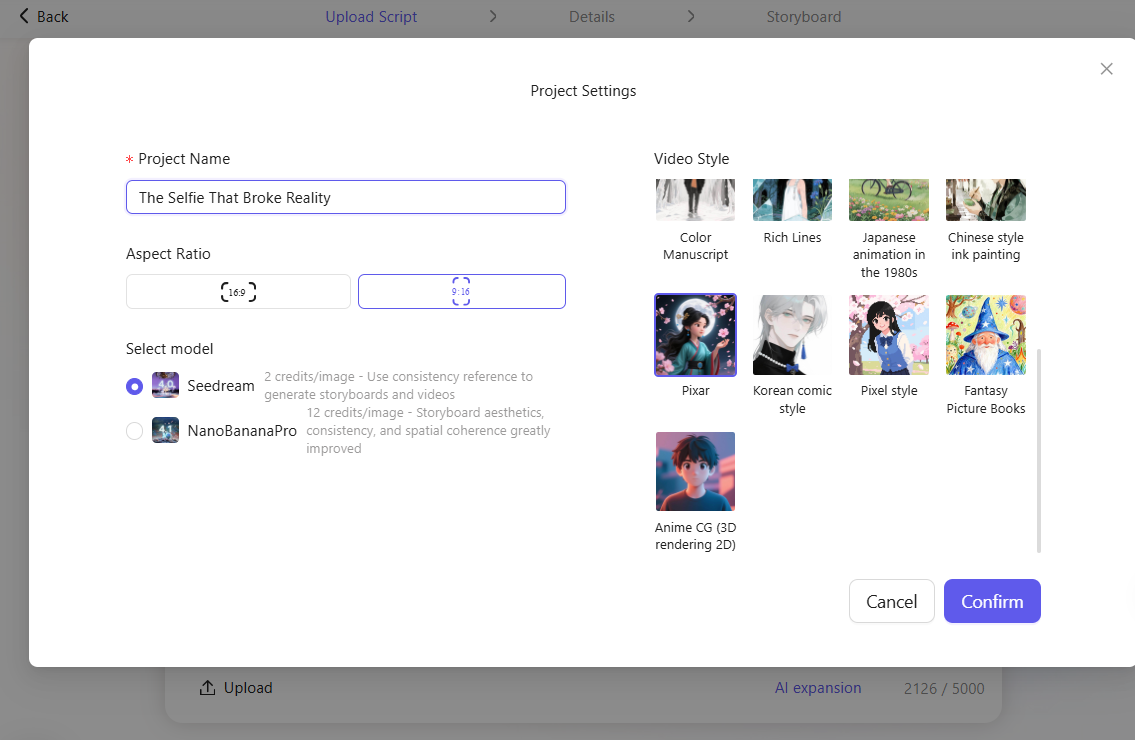
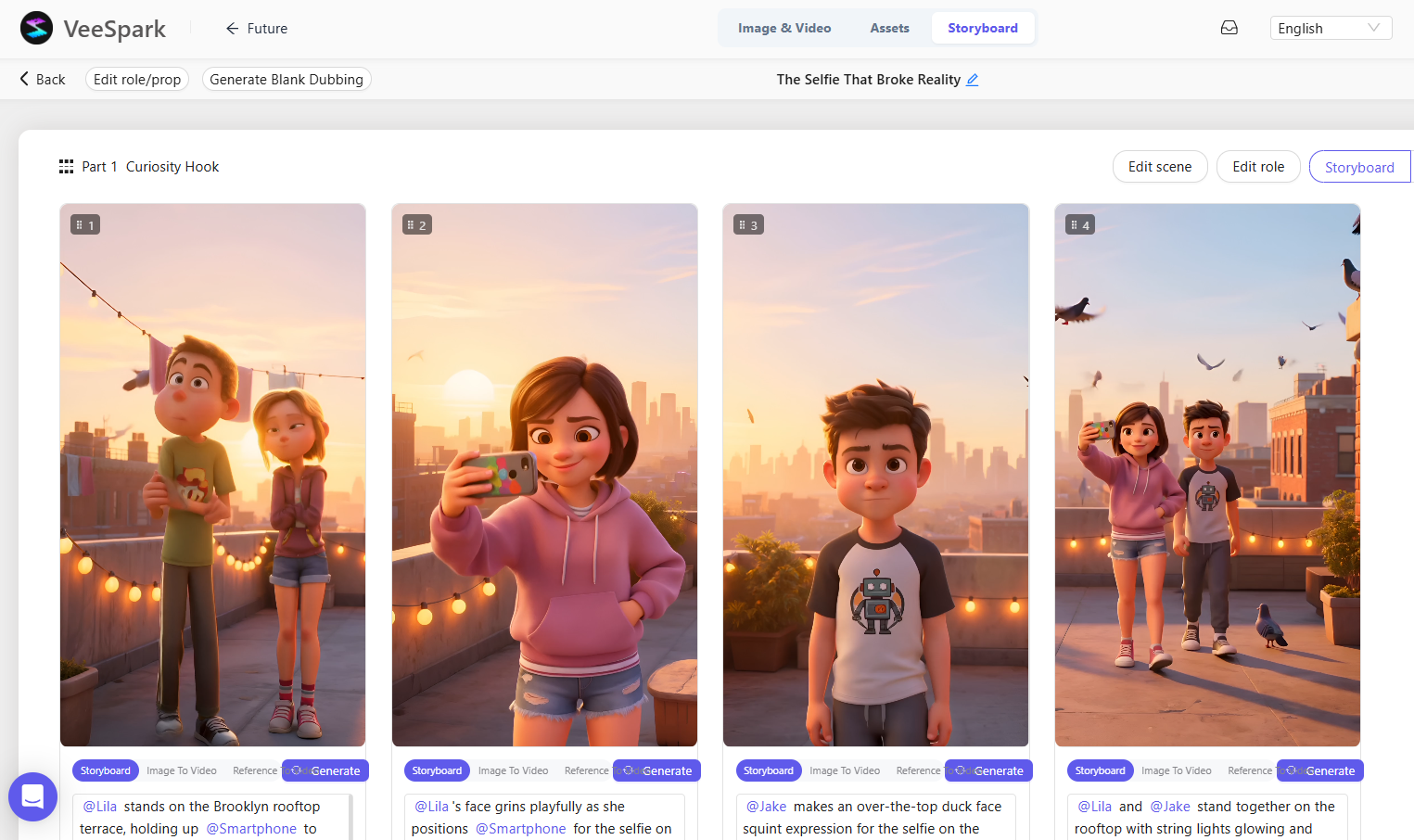
With your script ready, click "Next" VeeSpark's AI Scene Generator reads each scene and creates matching visual frames — complete with character poses, backgrounds, lighting, and camera angles. You can generate all frames at once or tackle them scene by scene.
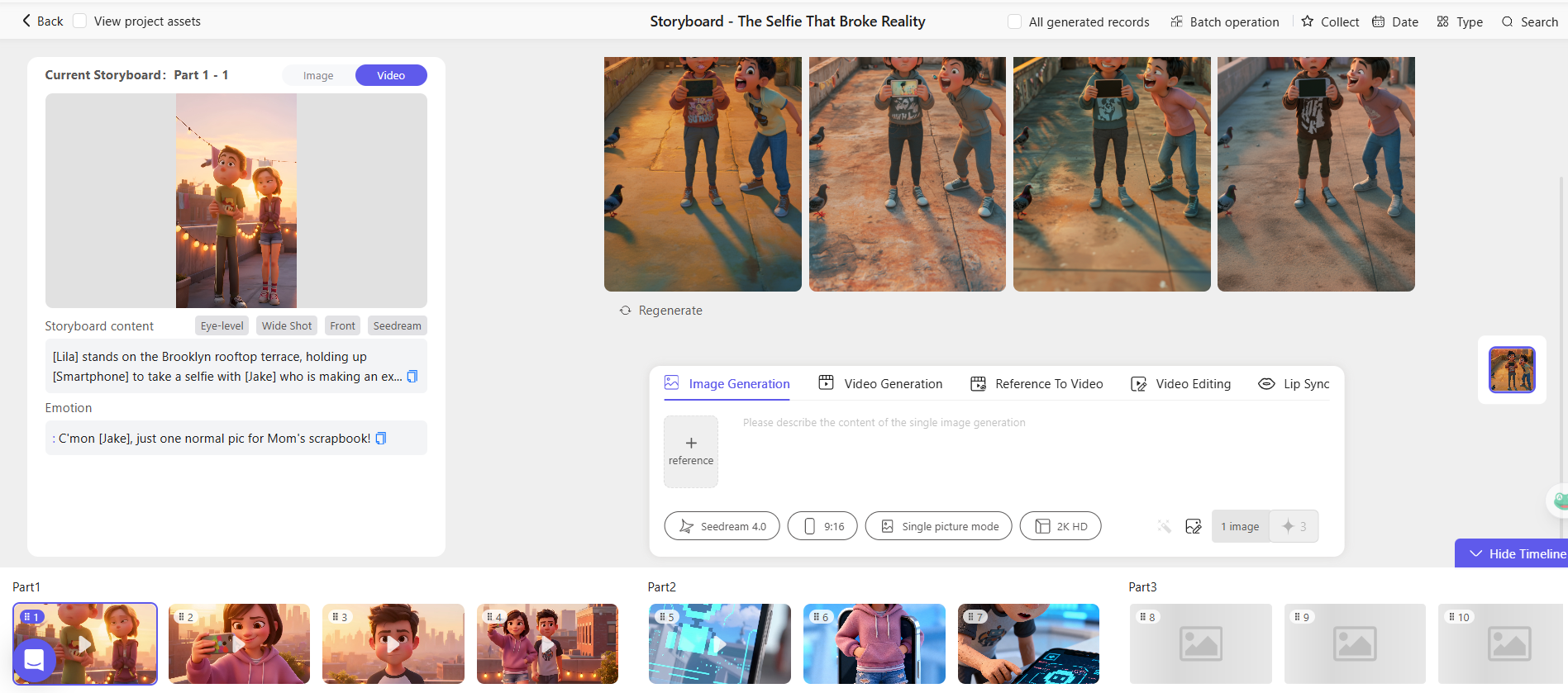
For any frame that needs tweaking, use the Frame Editor. Type what you want changed — "make the character look more determined," "shift to a low-angle shot," or "add fog to the background" — and the AI redraws just that element. You can also use Inpaint to selectively regenerate specific parts of any frame without touching the rest.
When you're satisfied, export your storyboard as a PPT Export, Editable Package, or an Capcut Draft. Share a link directly with collaborators or clients for real-time feedback — no account needed on their end.
.png)
- Use descriptive, specific prompts — Instead of "a character walks," try "a tired detective walks down a rain-soaked neon street at midnight, low-angle shot." Specificity produces far better frame results.
- Lock in your character early — Design your main character in the first scene and VeeSpark will maintain their look across every subsequent frame. This is especially important for animation series.
- Experiment with styles before committing — Use the style toggle on a single scene first to preview how "anime" vs. "cinematic" looks with your characters before applying globally.
- Use Idea Fission for multiple angles — Even if you have a clear concept, generating 10+ variations often surfaces a scene approach or visual direction you hadn't considered.
- Export animatics early — Share MP4 previews with clients before finalizing. Animatic approval eliminates expensive mid-production direction changes.
VeeSpark's animation storyboard tools are designed for a wide creative range:
- Independent animators who need to pitch concepts to studios or clients without hiring a storyboard artist.
- Marketing agencies creating animated commercials, product demos, or social video campaigns that need visual approval before production.
- Content creators and YouTubers planning animated shorts, explainer videos, or series episodes.
- Game developers visualizing cutscene sequences and in-game cinematics.
- Educators and e-learning creators building animated lesson content without a production team.
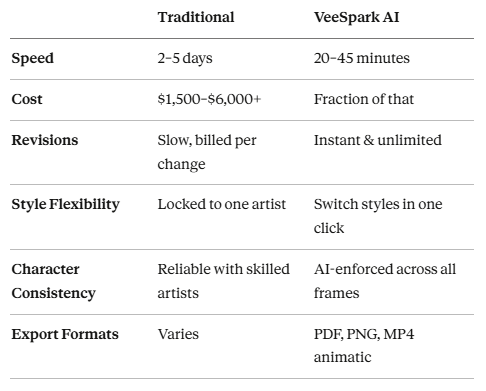
> 💰 Budget Friendly: Traditional storyboard artists charge $50–$200 per frame, meaning a 30-frame storyboard can cost $1,500–$6,000. VeeSpark's AI generates equivalent-quality storyboards at a fraction of that cost — making professional pre-production accessible to solo creators and small studios alike.
Do I need drawing skills to use VeeSpark's AI storyboard generator?
Not at all. VeeSpark is designed for creators at every skill level. You describe scenes in plain language and the AI handles all the visual work — from character design to background composition.
Can I maintain the same character across all storyboard frames?
Yes. VeeSpark's Character Consistency feature ensures your characters look identical in every frame — same proportions, colors, and style — no matter how many scenes your storyboard has. This is one of VeeSpark's most powerful differentiators for animation work.
What animation styles does VeeSpark support?
VeeSpark supports a wide range of styles including anime, cinematic, 3D, cartoon, noir, and realistic illustration. You can switch styles globally or apply them to individual frames.
Can I collaborate with my team on a VeeSpark storyboard?
Yes. VeeSpark supports real-time team collaboration. Share storyboard drafts with teammates or clients, co-edit scenes, and collect frame-level feedback — all without requiring collaborators to have advanced accounts.
Is content created with VeeSpark safe for commercial use?
All AI-generated storyboards, scripts, and visuals created through VeeSpark are royalty-free and copyright-safe for commercial use, provided they don't incorporate third-party protected materials. Permissions may vary by subscription plan — always review VeeSpark's Terms of Use for specifics.
Can I export my VeeSpark storyboard as a video animatic?
Yes. After arranging your scenes on the timeline and optionally adding audio, you can export your storyboard as an MP4 animatic — a rough animated preview that shows the pacing and flow of your animation before production begins.
Join thousands of creators turning ideas into cinematic storyboards in minutes — no drawing skills or production budget needed.
.png)

